Tabnine product updates roundup, April 2024 edition
Posted on April 11th, 2024
We’re more than a quarter of the way into 2024, and so much has already happened. A total solar eclipse enthralled North America. The Dune sequel reminded us of the power of riding sandworms. Beyoncé went country.
Things have been busy in Tabnine Land as well. Here’s a look at our recent product updates, including real-time switchable AI models, a new Onboarding Agent, follow-up questions in Tabnine Chat, and more.
And if you’d like to see all Tabnine AI coding assistant‘s new features in action, join us for a live demo on Tuesday, April 16.

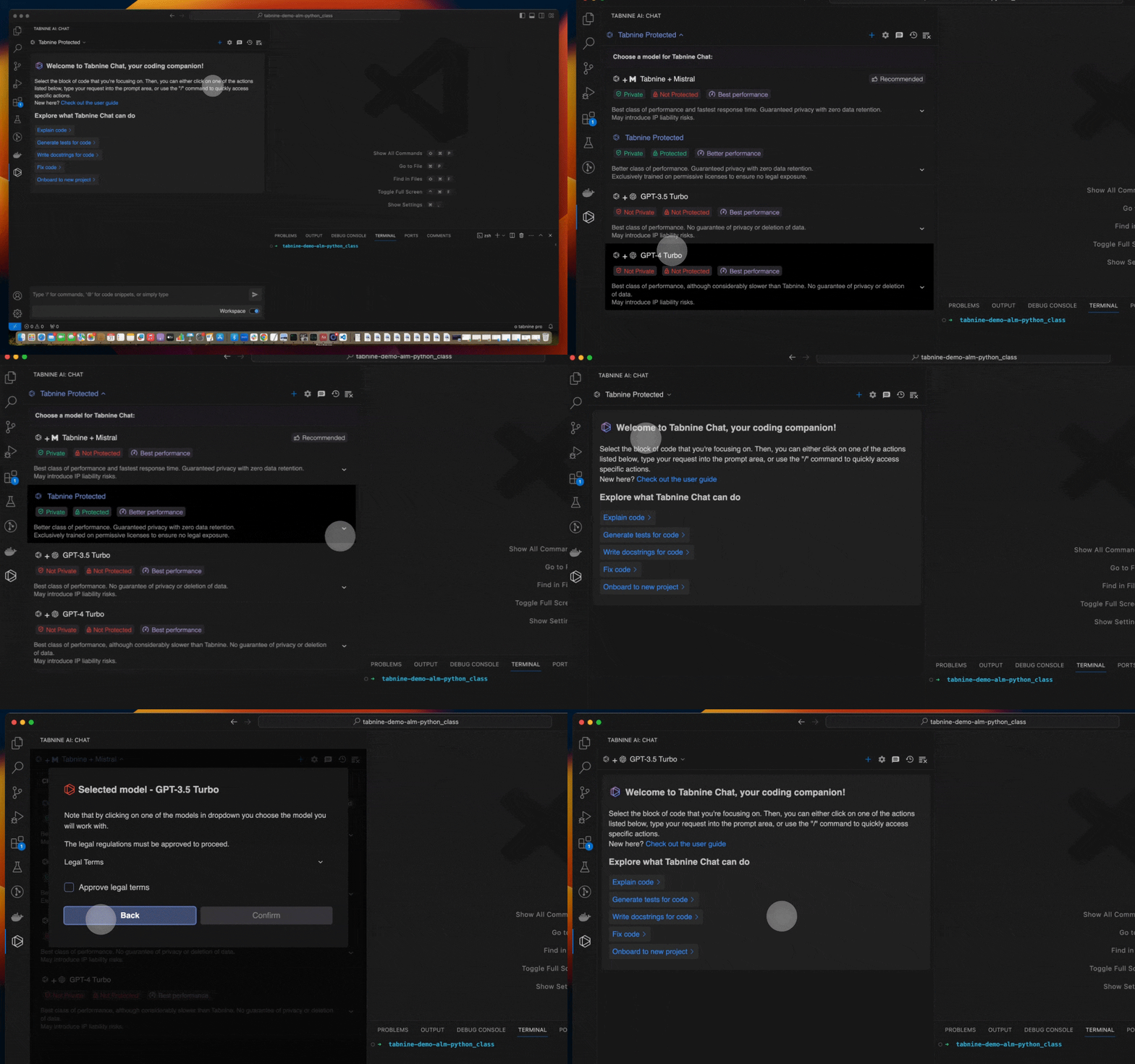
Switchable models for Tabnine Chat
We announced a powerful new capability that allows you to switch the underlying AI model that powers Tabnine Chat whenever you like. Choose from two custom-built, fully private models from Tabnine, plus popular LLMs from third parties (GPT-3.5 Turbo and GPT-4.0 Turbo). Whichever LLM you choose, you’ll always benefit from the full capability of Tabnine’s highly tuned AI chat agents.
This feature is currently available for Tabnine Chat users with a SaaS deployment and is compatible with all IDEs supporting Tabnine Chat.
Tabnine Pro users have access to all the models and can pick the model they prefer. Tabnine Enterprise admin users can contact our Support team and specify the models that should be enabled for their organization.
Onboarding Agent for Tabnine Chat
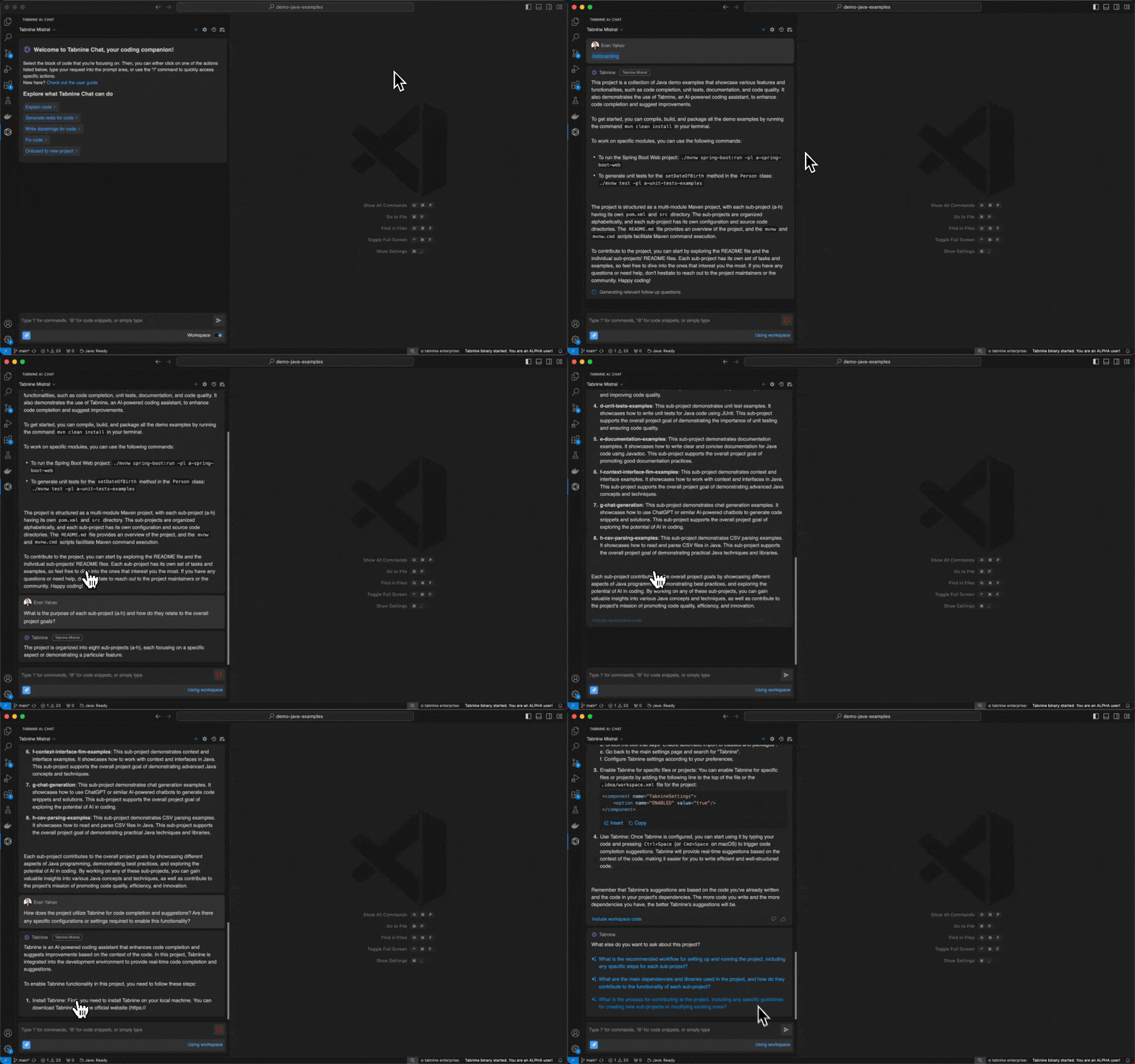
The Onboarding Agent helps developers quickly familiarize themselves with unfamiliar projects by providing instant access to essential project information within their IDE — including runnable scripts, dependencies, and overall structure — to help them get up to speed effortlessly. The Onboarding Agent is currently available for Tabnine Chat users with a SaaS deployment and is compatible with all IDEs supporting Tabnine Chat.
Follow-up questions in Tabnine Chat
Tabnine Chat now makes your coding experience even smoother with the new Follow-Up Questions feature, which suggests follow-up questions after every answer you receive. It’s like having an intelligent coding partner who anticipates your next move, ensuring a seamless flow of ideas and solutions.
This feature is available for all Tabnine Chat users.
Regenerate Chat answers with/without personalization
Following Tabnine’s personalization release, every answer from Tabnine generated with context includes the option to repeat the response without context. Note that the additional answer doesn’t replace the previous answer but is added to it, so you can easily compare the original response and the one with the excluded context.
This feature is available for all Tabnine Chat users.
[Webinar] Switchable Models, Personalization, and the Onboarding Agent
Join our CTO, Eran Yahav, for an exclusive webinar on April 16 highlighting these new updates, including the ability to easily switch between LLMs, new levels of personalization, our Onboarding Agent, and more. Register to reserve your spot.
New capabilities for team admins in Tabnine’s private installation
Python code debugging: Common bugs, tools, and best practices
Posted on April 9th, 2024
Debugging is a crucial aspect of Python programming that involves identifying and resolving errors or anomalies in your code. This article covers common types of errors you may encounter, such as syntax, runtime, and logical errors, along with more complex issues like performance bottlenecks and dependency problems.
We’ll also explore the main Python debugging tools available, from built-in debuggers to visual debuggers in IDEs and profiling tools. Lastly, the article outlines best practices to make your debugging process more efficient and effective. Armed with this knowledge, you’ll be better equipped to diagnose and fix problems in your Python programs.
This is part of a series of articles about code debugging.
Python debugging use cases
Syntax errors
Syntax errors are mistakes in your code that prevent your program from running correctly. Syntax errors usually occur when you violate the rules of the Python programming language.
For example, forgetting to close a parenthesis, or not correctly indenting your code, can lead to syntax errors. With Python code debugging, you can easily identify these errors and correct them. The Python interpreter points out where it got confused while trying to parse your code, making it easier for you to fix the issue.
Runtime errors
Runtime errors occur after your program has started running. They can be caused by issues like division by zero, file not found, out of memory errors, and more.
Debugging runtime errors can be a bit tricky since your code will often appear fine at first glance. However, with debugging tools, you can step through your code, examining the values of variables at various points, and identify where the problem lies.
Logical errors
Logical errors occur when your program runs without crashing, but it doesn’t produce the correct result. This is usually due to a flaw in your program’s logic.
For example, you might have written an algorithm that’s supposed to sort a list of numbers in ascending order, but instead, it sorts them in descending order. By debugging your Python code, you can identify the logic flaw and correct it, ensuring your program produces the right result.
Performance bottlenecks
Performance bottlenecks occur when a particular part of your code slows down the overall performance of your software. These bottlenecks can be due to inefficient algorithms, memory usage issues, or other problems.
Debugging these issues involves identifying the slow parts of your code and finding ways to improve their performance. With Python code debugging, you can use profiling tools to measure the execution time of different parts of your code, helping you identify and eliminate any performance bottlenecks.
Dependency problems
Dependency problems occur when your Python program relies on a particular library or module that is missing, outdated, or incompatible. These issues can be difficult to diagnose since the problem lies outside of your actual code.
However, Python’s debugging tools can help you identify these dependency issues. By stepping through your code and examining the output, you can find where the dependency issue is occurring and take steps to resolve it.
Types of Python debugging tools
There are several types of tools at your disposal for Python debugging:
Built-in Debugger (pdb)
Python comes with its built-in debugger, known as pdb. When you encounter an error in your code, pdb allows you to pause your program, look at the values of variables, and monitor the program execution step-by-step. This debugger provides a range of functionalities, right from setting conditional breakpoints, to inspecting stack frames. Learn more in the official documentation.
Debugging tools in IDEs
Visual debuggers in Integrated Development Environments (IDEs) provide an interactive user interface for debugging your Python code. These tools offer a more visual and intuitive debugging experience.
PyCharm, Visual Studio Code, and Eclipse PyDev are popular IDEs that come with robust debugging tools. They allow you to set breakpoints, step through your code, inspect variables, and visualize complex structures in a user-friendly manner. Some IDEs also provide visual debugging features or extensions, which can help you visualize complex code structures and understand where the problem lies.
Profiling tools
Profiling tools are another great asset for Python code debugging. They help you identify performance bottlenecks in your code by providing detailed statistics about the execution time of different parts of your program. Tools like cProfile and Profile provide deterministic profiling of Python programs. They can generate reports that help you understand the runtime behavior of your programs and optimize them for better performance.
Generative AI tools
Recent advances in generative AI make it possible to fully automate debugging tasks in Python and other languages. AI-powered coding assistants like Tabnine can predict and generate code completions in real time, and can provide automated debugging suggestions, which are sensitive to the context of your software project.
Tabnine integrates with the common Python IDEs. As you type in your IDE, Tabnine analyzes the code and comments, predicting the most likely next steps and offering them as suggestions for you to accept or reject.
Tabnine utilizes a Large Language Model (LLM) trained on reputable open source code with permissive licenses, StackOverflow Q&A, and even your entire codebase (Enterprise feature). This means it generates more relevant, higher quality, more secure code than other tools on the market.
Tabnine is the AI coding assistant that helps development teams of every size use AI to accelerate and simplify the software development process without sacrificing privacy, security, or compliance. Tabnine boosts engineering velocity, code quality, and developer happiness by automating the coding workflow through AI tools customized to your team. Tabnine supports more than one million developers across companies in every industry.
Unlike generic coding assistants, Tabnine is the AI that you control:
It’s private. You choose where and how to deploy Tabnine (SaaS, VPC, or on-premises) to maximize control over your intellectual property. Rest easy knowing that Tabnine never stores or shares your company’s code.
It’s personalized. Tabnine delivers an optimized experience for each development team. It’s context-aware and can be tuned to recommend based on your standards. You can also create a bespoke model trained on your codebases.
It’s protected. Tabnine is built with enterprise-grade security and compliance at its core. It’s trained exclusively on open source code with permissive licenses, ensuring that our customers are never exposed to legal liability.
Best practices for Python debugging
Now that you’re familiar with the tools, let’s look at some best practices to follow while debugging your Python code.
Start with a clear hypothesis
Before diving into debugging, form a clear hypothesis about what might be causing the issue. This involves understanding the error message, identifying the code area where the problem might be, and predicting the behavior that’s causing the problem. Having a clear hypothesis helps you focus your debugging efforts efficiently and saves time.
Isolate the issue
The next step in Python code debugging is to isolate the problematic code. This involves reducing your code to the minimum possible set that still reproduces the issue. This process of isolation helps to eliminate any external factors that might be affecting the outcome, allowing you to focus solely on the problem at hand.
Use post-mortem debugging
Post-mortem debugging is a powerful technique that allows you to inspect the state of your program at the point of an exception. Python’s pdb provides a post-mortem debugging mode where you can inspect variables, look at the call stack, and understand what led to the exception. This can provide valuable insights into the root cause of the error.
Conclusion
Debugging is a fundamental skill for Python programmers. This article has covered various types of errors, from syntax and runtime to logical errors, as well as performance bottlenecks and dependency problems. We’ve also discussed the range of tools available for Python debugging, such as pdb, Python’s built-in debugger, IDE-based debugging tools, profiling tools, and even AI-powered coding assistants. Finally, best practices like forming a clear hypothesis, isolating the issue, and using post-mortem debugging can streamline the debugging process.
Understanding these elements equips you to more effectively identify problems, evaluate the state of your code, and implement solutions. Debugging is not just about fixing immediate issues; it’s also about gaining deeper insights into how your code operates and taking your Python programs to the next level.

Code refactoring tools: 7 popular tools and why you need them
Posted on April 4th, 2024
What are code refactoring tools?
Code refactoring tools are software applications that aid programmers in restructuring existing computer code, without changing its external behavior. The refactoring process enhances the code’s readability and efficiency and reduces its complexity, with the end goal of improving the software’s maintainability.
Refactoring is a crucial part of the software development process, especially in Agile development environments. It helps to keep the code base clean, maintainable, and efficient. Without regular refactoring, the code can become bloated, inefficient, and difficult to understand.
Code refactoring tools automate many common refactoring tasks, making the process faster and less prone to human error. We’ll briefly review a range of tools—some provided as a feature or add-on to general-purpose development tools, and others which are entirely dedicated to code refactoring.
Key features of code refactoring tools
When selecting a code refactoring tool, here are the main capabilities you should look for:
- Language support: Does the tool support the programming languages you are working with? Some tools are language-specific, while others support multiple languages.
- IDE iIntegration: How seamlessly does the tool integrate with your current Integrated Development Environment (IDE)? Ease of integration can impact the workflow.
- Refactoring operations: What specific refactoring tasks can the tool automate? This could range from renaming variables to extracting methods or classes.
- Real-time analysis: Does the tool offer real-time code analysis to suggest refactoring opportunities as you code?
- Code quality metrics: Does the tool provide metrics or indicators to measure the quality of the code before and after refactoring? Metrics can include cyclomatic complexity, maintainability index, etc.
- Static code analysis: Can the tool identify issues such as code smells, vulnerabilities, or bugs that require refactoring? The ability to spot these issues adds another layer of utility.
- Test integration: Does it integrate with test frameworks to ensure that the refactoring hasn’t broken existing functionality? Running tests before and after refactoring is crucial for ensuring code stability.
- Version control integration: How well does the tool integrate with version control systems like Git? This helps in tracking changes and facilitates collaboration.
Can you automate code refactoring with generative AI?
The rise of generative AI has brought a significant shift in code refactoring. Generative AI, leveraging advanced machine learning techniques, can automate many aspects of the refactoring process. This technology goes beyond traditional tools by not only identifying potential refactoring opportunities but also suggesting and even implementing code changes.
Generative AI learns from vast datasets of code, understands coding patterns and best practices, and can provide highly relevant and context-aware suggestions. For instance, it can analyze the specific architecture and dependencies of a software project, ensuring that any proposed refactoring aligns with the overall design and doesn’t introduce new issues.
Moreover, generative AI can handle a wider range of refactoring tasks with greater complexity than manual methods or traditional tools. From restructuring modules to optimizing algorithmic efficiency, generative AI can tackle tasks that would be time-consuming and error-prone for human developers. This not only speeds up the refactoring process but also enhances the overall quality and maintainability of the code.
Traditional code refactoring tools
1. IntelliJ IDEA
IntelliJ IDEA is a popular integrated development environment (IDE) used by many developers for Java application development. It also supports additional languages like JavaScript and Python. Beyond its regular IDE capabilities, IntelliJ IDEA is also known for its refactoring features.

IntelliJ IDEA is a popular integrated development environment (IDE) used by many developers for Java application development. It also supports additional languages like JavaScript and Python. Beyond its regular IDE capabilities, IntelliJ IDEA is also known for its refactoring features.
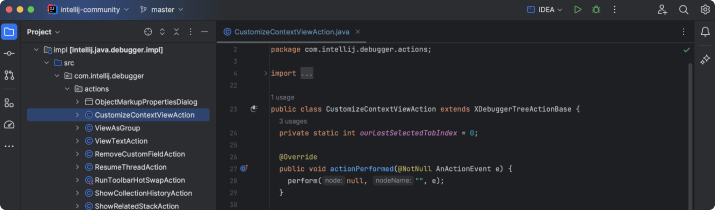
IntelliJ IDEA can help refactor code across multiple languages and frameworks. It can perform code refactoring tasks such as renaming, moving, and extracting methods, variables, classes or interfaces. Additionally, it helps in inlining variables and methods, thus making your code more readable and maintainable.
Another feature of IntelliJ IDEA that supports refactoring is its smart assistance. The tool provides relevant suggestions as you type and automatically completes your code, reducing the chances of typos and errors. It also has a built-in static code analysis feature that helps you identify potential issues and inefficiencies in your code.
2. Visual Studio Code

Visual Studio Code (VS Code) is a free, open-source IDE developed by Microsoft. It supports multiple programming languages and comes with a rich set of features, including several tools that can assist refactoring.
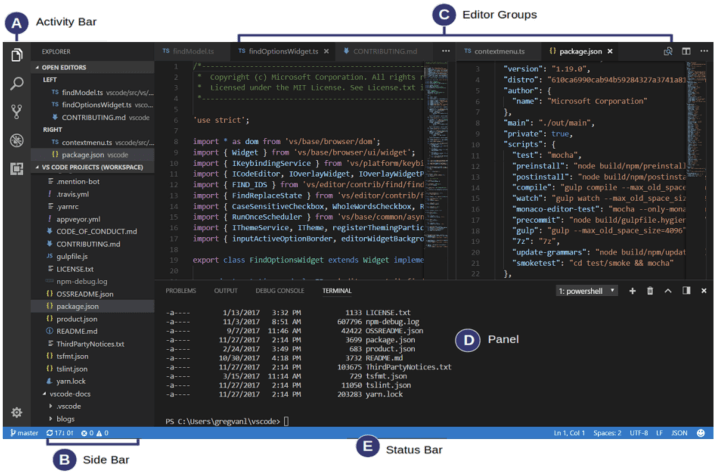
VS Code’s refactoring tools allow you to rename symbols, extract methods or variables, and move code around with ease, while automatically updating references. The tool also provides a preview of changes before applying them, ensuring that you are in complete control of the refactoring process.
VS Code provides access to Microsoft’s testing framework, MSTest, which lets you build and maintain test cases to identify if refactoring is breaking the code. It also has a wide array of extensions that can further enhance its refactoring capabilities.
3. CodePal

CodePal is a cloud-based AI coding assistant. It has a wide variety of tools that can automatically generate code in multiple programming languages, as well as review existing code and suggest optimizations and improvements.
CodePal offers a range of refactoring operations, such as renaming, moving, and extracting code. It also provides automated fixes for common coding issues and anti-patterns, an automated code reviewer, code simplify, and code visualizer. The tool’s AI-powered engine analyzes your code in real-time and provides suggestions to improve code quality and efficiency.
4. SonarLint

SonarLint is a static code analysis tool that helps developers write cleaner and safer code. It works by analyzing your code as you type and providing instant feedback on potential issues. It integrates with multiple popular IDEs, including IntelliJ IDEA, Eclipse, and Visual Studio.
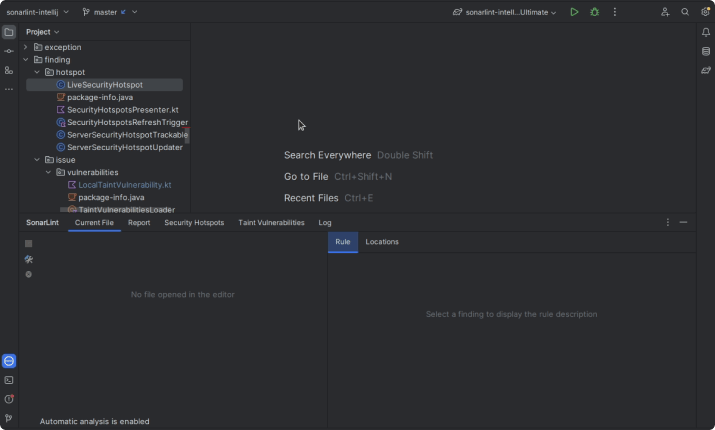
SonarLint supports a wide range of languages, including Java, JavaScript, TypeScript, Python, and more. It can identify and fix a variety of code issues, including bugs, vulnerabilities, code smells, and inefficiencies. The tool also provides detailed explanations of the identified issues and suggests ways to fix them, helping you understand and learn from your mistakes.
5. AppRefactoring

AppRefactoring is another powerful tool that can help you improve your code quality and efficiency. It is a cloud-based tool that supports a variety of programming languages and frameworks, and provides strong support for mobile and web applications.
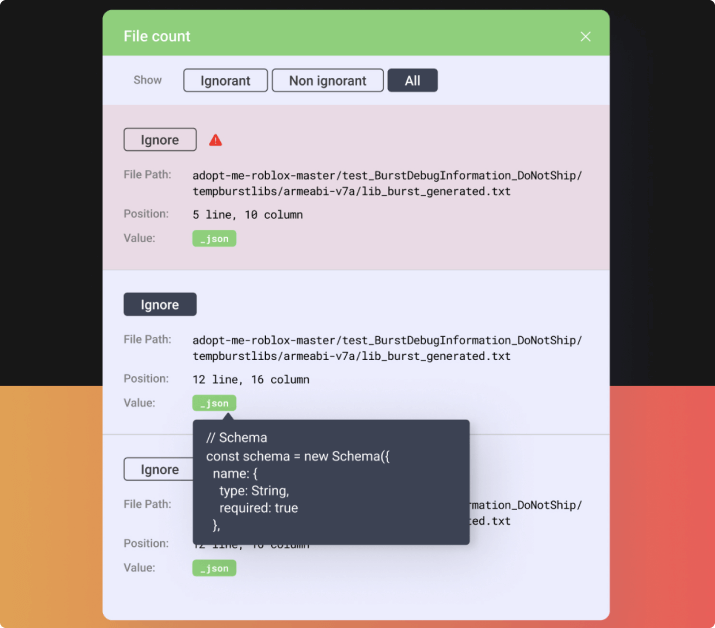
AppRefactoring offers a wide range of refactoring operations, including renaming, moving, extracting, and inlining code. It also has a built-in code analysis feature that helps you identify potential issues and inefficiencies in your code. It provides powerful comparison features that allow you to compare code to other projects, and add your own exceptions to allow customized code analysis.
6. Bowler

Bowler is a refactoring tool specifically designed for Python. It uses a unique approach to refactoring—it allows you to describe refactorings using a query language, which makes the tool highly flexible and customizable.
Bowler’s query language allows you to specify what code to match, what changes to make, and where to apply those changes. This means you can perform complex refactorings with just a few lines of code.
Bowler also integrates with Git, allowing you to track your changes and revert back if something goes wrong. The tool provides a preview of changes before applying them, ensuring that you are in complete control of the refactoring process.
And one more refactoring tool using generative AI
After reviewing the traditional tools, let’s look at one more tool that can change the way you refactor your code. It’s our very own Tabnine, a coding assistant based on generative AI technology.
7. Tabnine
Tabnine is an AI-powered coding assistant that can predict and generate code completions in real time, and can provide automated code refactoring suggestions, which are sensitive to the context of your software project.
Tabnine utilizes a large language model (LLM) trained on reputable open source code with permissive licenses, StackOverflow Q&A, and even your entire codebase. This means it generates more relevant, higher quality, more secure code than other tools on the market.
Tabnine is the AI coding assistant that you control — helping development teams of every size use AI to accelerate and simplify the software development process without sacrificing privacy, security, or compliance. Tabnine boosts engineering velocity, code quality, and developer happiness by automating the coding workflow through AI tools customized to your team. Tabnine supports more than 1,000,000 developers across companies in every industry.
Code refactoring in Java: OO vs. functional approach with examples
Posted on April 4th, 2024
What is code refactoring in Java?
Code refactoring is a process that involves altering an existing body of code by changing its internal structure without affecting its external behavior. The main goal of refactoring is to improve the non-functional attributes of the software. In simpler terms, it is a systematic approach to cleaning up your code, making it more readable, maintainable, and efficient without altering its functionality.
The concept of code refactoring goes beyond just rewriting the code. It includes restructuring, optimization, and the removal of unnecessary elements from the code, while preserving its functionality.
There are several common reasons developers choose to refactor Java code:
- Enhancing readability and maintainability: Code readability is about making your code understandable to other developers, and potentially, your future self. Refactoring enhances code readability by organizing and simplifying the code, making it easier to read and understand. The easier the code is to read, the easier it is to maintain.
- Reducing technical debt: Technical debt refers to the future cost of past decisions made during software development. It could be the cost of fixing bugs that were ignored, or the cost of replacing outdated technologies. Refactoring helps in addressing and reducing this technical debt.
- Facilitating future modifications: Refactoring is not just about improving the current state of the code; it’s also about preparing it for future changes. As requirements change and new features are added, the code needs to be able to accommodate these changes. Refactoring makes the code more flexible and modular, making it easier to extend.
- Improving performance: Refactoring can often improve performance of existing applications. By simplifying and optimizing the code, refactoring can lead to more efficient code that performs better. For instance, refactoring can eliminate unnecessary calls to the database, reduce memory used by a method, or speed up method execution.
- Updating from Older Java Versions to Java 11: Java 11 brought several new features and improvements, but also removed or deprecated some older features. Refactoring can help in updating your code from older versions of Java to Java 11. This can help you take advantage of the new features in the latest version of Java.
Approaches to refactoring Java code: OO vs. functional
You can approach Java refactoring using two main approaches: Object-Oriented (OO) and Functional Programming (FP). It is also possible to combine these approaches:
- Object-Oriented (OO) approach: In OO, the focus is on designing clean class hierarchies and interactions between objects. Common refactoring techniques here include encapsulating fields, extracting classes, and replacing inheritance with delegation, among others. It is especially effective for projects that require complex state management and operations that are naturally modeled as interactions between objects.
- Functional approach: Focuses on writing code as a series of stateless functions. Techniques often involve using higher-order functions, immutable data structures, and the Stream API. This approach can simplify data manipulation, make the code easier to test, and often results in fewer side effects.
- Hybrid approach: Some modern Java projects adopt a hybrid approach, mixing elements from both paradigms. For example, a project may use OO principles for overall architecture but adopt functional programming techniques for data manipulation and logic that doesn’t involve side effects.
The choice between OO and FP or a mix of both should be based on factors such as project requirements, team expertise, and the nature of the problems being solved.
Refactoring Java code using an OO approach with examples
Encapsulate fields
Encapsulation is a fundamental principle of object-oriented programming. It’s about hiding the internal state of an object and allowing access to it only through methods.
For example, consider a class Person with public fields name and age. Instead of accessing these fields directly, you can encapsulate them by making them private and providing public getter and setter methods.
Refactoring to encapsulate fields can make your code more robust and easier to maintain, as it ensures that the internal state of an object can’t be changed arbitrarily.
// Before encapsulation

public class Person {

    public String name;

    public int age;

}


// After encapsulation

public class Person {

    private String name;

    private int age;


    public String getName() {

        return name;

    }


    public void setName(String name) {

        this.name = name;

    }


    public int getAge() {

        return age;

    }


    public void setAge(int age) {

        this.age = age;

    }

}
Extract class
Sometimes, a class may become too large and difficult to maintain. In such cases, it may be beneficial to extract a part of that class into a new class. This is known as extract class refactoring.
For instance, if you have a class Order that handles both order details and payment details, you can extract the payment details into a new class Payment. This way, each class has a single, clear responsibility, making the code easier to understand and maintain.
// Before extracting class
public class Order {
    String orderDetails;
    String paymentDetails;
}

// After extracting class
public class Order {
    String orderDetails;
    Payment payment;
}

public class Payment {
    String paymentDetails;
}
Extract method
The extract method technique involves taking a part of a larger method and moving it into a new method. This can make the code more readable and easier to understand.
For example, if you have a method calculateTotal that calculates the total price of an order and applies a discount, you can extract the discount calculation into a new method calculateDiscount. This way, each method has a single, clear responsibility.
// Before Extract Method
public double calculateTotal(double price, double discount) {
    return price - (price * discount / 100);
}

// After Extract Method
public double calculateTotal(double price, double discount) {
    double discountAmount = calculateDiscount(price, discount);
    return price - discountAmount;
}

public double calculateDiscount(double price, double discount) {
    return price * discount / 100;
}
Pull-up method / push-down method
The pull-up method and push-down methods involve moving a method up or down the class hierarchy.
The pull-up method is used when a method is present in multiple subclasses and can be moved to the superclass to avoid duplication. The push-down method, on the other hand, is used when a method is present in a superclass but is only relevant to some of its subclasses.
These refactoring techniques can make the code more logical and easier to maintain, as they ensure that each class only contains the methods that are relevant to it.
// Before Pull Up
class Animal {}
class Dog extends Animal {
    void bark() {}
}
class Cat extends Animal {
    void bark() {}
}

// After Pull Up
class Animal {
    void bark() {}
}
class Dog extends Animal {}
class Cat extends Animal {}
Replace inheritance with delegation
Inheritance is a powerful feature of object-oriented programming, but it can sometimes lead to complex and inflexible code. The ‘replace inheritance with delegation’ technique involves replacing a superclass-subclass relationship with a more flexible delegate relationship.
For instance, instead of having a class Rectangle inherit from a class Shape, you can have Rectangle contain an instance of Shape and delegate the shape-related methods to this instance. This can make the code more flexible and easier to modify.
// Before
class Rectangle extends Shape {
}

// After
class Rectangle {
    private Shape shape;

    public void draw() {
        shape.draw();
    }
}
Refactoring Java code using a functional approach with examples
Replace loops with stream API
The Stream API was introduced in Java 8 and provides a more declarative way to manage and manipulate data collections. It allows developers to write code that is more readable and easier to understand.
For instance, consider a simple loop that sums all the elements in a list. Using the traditional approach, we would initialize a sum variable and iterate through each element, incrementing the sum. However, using the Stream API, we can do the same task in a single line: int sum = list.stream().mapToInt(i -> i).sum();. The code is not only shorter but also more intuitive and readable.
// Before
int sum = 0;
for(int i : list) {
    sum += i;
}

// After
int sum = list.stream().mapToInt(i -> i).sum();
Use Lambda expressions
Lambda expressions have become an integral part of Java programming since their introduction in Java 8. They provide a clear and concise way to represent one method interface using an expression. Lambda expressions also enable us to write more functional and streamlined code in Java.
For example, consider a situation where we need to sort a list of strings. Using the traditional approach, we’d need to create an anonymous Comparator class, which can be quite verbose. With lambda expressions, we can accomplish the same task with a single line of code: Collections.sort(list, (s1, s2) -> s1.compareTo(s2));. This approach is much cleaner and easier to understand, making our code more maintainable.
// Before
Collections.sort(list, new Comparator<String>() {
    public int compare(String s1, String s2) {
        return s1.compareTo(s2);
    }
});

// After
Collections.sort(list, (s1, s2) -> s1.compareTo(s2));
Immutable data structures
Immutability is a powerful concept that can significantly enhance the quality of your code. An object is considered immutable if its state cannot change after it’s created. In Java, we can achieve immutability by declaring all class fields final and only providing getter methods.
Immutable data structures are easier to reason about since they do not have complex state histories. They can also improve the robustness and reliability of your code. For example, when dealing with multi-threaded applications, using immutable data structures can help avoid synchronization issues.
// Before

public class Item {

    public String name;

}


// After

public final class Item {

    private final String name;


    public Item(String name) {

        this.name = name;

    }


    public String getName() {

        return name;

    }

}
Extract function
Another useful technique for refactoring code in Java is ‘extract function’. This involves breaking down complex functions into smaller, more manageable ones. This approach improves the readability and maintainability of your code, making it easier to test and debug.
For example, suppose we have a method that calculates and prints the total cost of all items in a shopping cart. We could refactor this method by extracting the calculation logic into a separate function. This separation of concerns makes our code more modular and easier to understand.
// Before
public class Item {
    public String name;
}

// After
public final class Item {
    private final String name;

    public Item(String name) {
        this.name = name;
    }

    public String getName() {
        return name;
    }
}
Higher-order functions
In functional programming, higher-order functions are those that take one or more functions as parameters, or return a function as a result. Java 8 introduced support for higher-order functions, which can significantly improve the modularity and reusability of our code.
For instance, suppose we have a list of integers and we want to perform various operations on this list, such as calculating the sum, product or finding the maximum value. Instead of writing separate methods for each operation, we can write a higher-order function that takes a binary operator (a function) as a parameter and applies it to the list.
// Before
public void calculateAndPrintTotal(List<Item> cart) {
    double total = 0;
    for(Item item : cart) {
        total += item.getPrice();
    }
    System.out.println("Total: " + total);
}

// After
public double calculateTotal(List<Item> cart) {
    return cart.stream()
               .mapToDouble(Item::getPrice)
               .sum();
}

public void printTotal(double total) {
    System.out.println("Total: " + total);
}
Best practices for Java refactoring
Ensure comprehensive test coverage
Before embarking on any refactoring process, it’s crucial to have comprehensive test coverage for your code. Tests provide a safety net and ensure that your refactoring does not inadvertently introduce new bugs or regressions. Additionally, tests can serve as documentation, clearly outlining the expected behavior of your code.
Make small, incremental changes
When refactoring, it’s advisable to make small, incremental changes rather than large, sweeping ones. Small changes are easier to understand and test, reducing the risk of introducing new bugs. Additionally, if a bug does arise, it’s much easier to identify and fix the problem when the changes are small and isolated.
Prefer clarity and simplicity
While it might be tempting to show off your programming prowess with clever, intricate solutions, it’s best to favor clarity when refactoring your code. Code is read far more often than it’s written, so prioritizing readability can save you and your colleagues a lot of time and frustration in the long run. Remember, the goal of refactoring is to improve the design and structure of your code, not to make it more convoluted.
Minimize external dependencies
Lastly, try to minimize your code’s dependencies on external systems or libraries when refactoring. External dependencies can make your code more fragile and harder to test. If you must rely on an external system, make sure to isolate the interaction as much as possible to make your code more robust and maintainable.
Automating code refactoring with generative AI
Tabnine accelerates and simplifies the entire software development process with AI agents that help developers create, test, fix, document, and maintain code. In addition to generating code, Tabnine can also extend and refactor existing code.
To extend code with Tabnine, simply highlight the code you want it to consider, then ask Tabnine to add functionality through the chat window. Tabnine will generate code for you taking into account the context of project files open in your IDE.
Refactoring code with Tabnine is even easier. Simply highlight a function and then ask Tabnine to factor the function according to your specifications in chat. Tabnine will generate suggested changes that you can apply to your code with the click of a button.

Switchable models come to Tabnine Chat
Posted on April 2nd, 2024
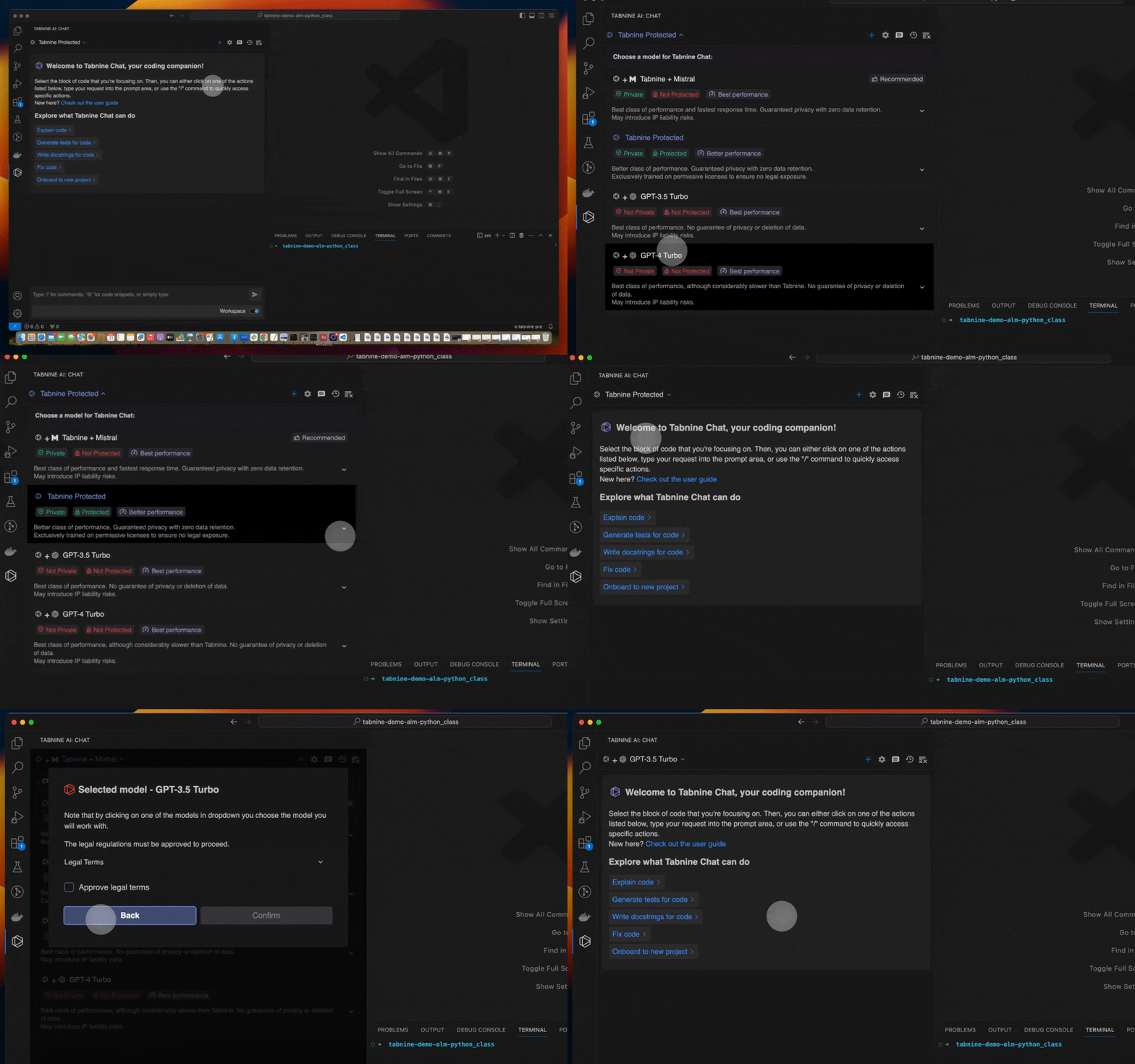
We’re thrilled to unveil a powerful new capability that puts you in the driver’s seat when using Tabnine. Starting today, you can switch the underlying large language model (LLM) that powers Tabnine’s AI chat at any time. In addition to the built-for-purpose Tabnine Protected model that we custom-developed for software development teams, you now have access to additional models from Open AI and a new model that brings together the best of Tabnine and Mistral, the leading open source AI model provider.
You can choose from the following models with Tabnine’s AI software development chat tools:
- Tabnine Protected: Tabnine’s original model, designed to deliver high performance without the risks of intellectual property violations or exposing your code and data to others.
- Tabnine + Mistral: Tabnine’s newest offering, built to deliver the highest class of performance while still maintaining complete privacy.
- GPT-3.5 Turbo and GPT-4.0 Turbo: The industry’s most popular LLMs, proven to deliver the highest levels of performance for teams willing to share their data externally.
More importantly, you’re not locked into any one of these models. Switch instantly between models for specific projects, use cases, or to meet the requirements of specific teams. No matter which LLM you choose, you’ll always benefit from the full capability of Tabnine’s highly tuned AI agents.
Today’s announcement comes on the heels of our recent major update that delivers highly personalized AI recommendations. Together, these enhancements enable you to maximize the value that you get from Tabnine.
Why do users need flexibility to choose models?
Generative AI has gone mainstream in just a couple of years, and developments continue to unfold rapidly. More powerful LLMs are regularly being introduced in the market. As we’ve seen in past innovation cycles, increased competition brings new releases that challenge the supremacy of older releases — sometimes from a different company or sometimes within the same provider. In addition, new vendors continue to enter the market, each with characteristics that are desirable or undesirable for their intended users.
Historically, when an engineering team selects an AI software development tool, they pick both an application (the AI coding assistant) and the underlying model (e.g., Tabnine’s custom model, GitLab’s use of Google’s Vertex Codey, Copilot’s use of OpenAI). But what if an engineering team has different expectations or requirements than the parameters used to create that model? What if they want to take advantage of an innovation produced by an LLM other than what powers their current AI coding assistant? What if one model is better for one project or use case, but another is better for a different project? What if customers want to use LLMs that they trained themselves with the AI coding assistant?
Ideally, engineering teams should be able to use the best model for their use case without having to run multiple AI assistants or switch vendors. They should be able to choose the LLMs under their favorite tools based on a model’s performance, its privacy policies, and the code the model was trained on. They should be able to benefit from advancements in new LLMs without having to install, integrate, deploy, and train their users on a different tool. To date, all of this has not been possible with the best-of-breed AI coding assistants. Tabnine is changing that with today’s announcement.
Future-proof your AI investment and avoid LLM lock-in
Tabnine has supported unique models under our AI coding assistant for some time — Tabnine Enterprise customers can run their own fine-tuned model that’s trained on their unique code. With this inherent flexibility, we can bring state-of-the-art models from various sources into Tabnine with relative ease. As such, on top of the four models available today, we will soon introduce support for even more models to Tabnine Chat.
Switchable models give engineering teams the best of two worlds: the rich understanding of programming languages and software development methods native within the LLMs, along with the years of effort Tabnine has invested in creating a developer experience and AI agents that best exploit that understanding and fit neatly into development workflows.
LLMs are a critical component of any AI software development, but they’re ineffective assistants if used solely on their own. Tabnine has created highly advanced, proprietary methods to maximize the performance, relevance, and quality of output from the LLM, including complex prompt engineering, intimate awareness of the local code and global codebase to benefit from the context of a user’s or team’s existing work, and fine-tuning of the experience for specific tasks within the software development life cycle. By applying that expertise uniquely to each LLM, Tabnine’s users get an AI coding assistant that makes optimal use of each model. And with Tabnine’s ongoing support for all of the most popular IDEs and integrations with popular software development tools, engineering teams get an AI assistant that works within their existing ecosystem.
Tabnine eliminates any worry about missing out on LLM innovations and makes it simple to use new models as they become available. Tabnine future-proofs your investment in accelerating and simplifying software development using AI.
Selecting models for each situation
Selecting the right model for your team or project is not as simple as picking the most popular one. Adopting AI tools comes with critical decisions around data and code privacy, data storage and residency, and intellectual property considerations. Privacy concerns and the business risks of license and copyright violations are the top reasons many companies have resisted rolling out generative AI tools.
When picking the underlying LLMs to be used in your AI software development tools, there are three main considerations:
- Performance: Does the model provide accurate, relevant results for the programming languages and frameworks I’m working in right now?
- Privacy: Does the model store my code or user data? Could my code or data be shared with third parties? Is my code used to train their model?
- Protection: What code was the model trained on? Is it all legally licensed from the author? Will I create risks for my business by accepting generated code from a model trained on unlicensed repositories?
During model selection, Tabnine provides transparency into the behaviors and characteristics of each of the available models to help you decide which one is right for your situation.
Switch models at will
Tabnine offers users the utmost flexibility and control over choosing their models for Tabnine Chat:
- Tabnine Pro users specify their preferred model the first time they use Chat, and can change it at any time. For projects where data privacy and legal risks are less important, you can use a model optimized for performance over compliance. As you switch to working on projects that have stricter requirements for privacy and protection, you can change to a model like Tabnine Protected that is built for that purpose. The underlying LLM can be changed with just a few clicks — and Tabnine Chat adapts instantly.
- Tabnine Enterprise administrators control and specify the models that are available at their organization. Administrators set default models for their teams. Enterprises often make strategic bets on using specific models across their organization. This update helps make Tabnine compatible with your chosen LLM and a part of its ecosystem and makes it easier for you to get the most out of Tabnine without evolving your LLM strategy.
Regardless of the model selected, engineering teams get the full capability of Tabnine, including code generation, code explanations, documentation generation, and AI-created tests — and Tabnine is always highly personalized to each engineering team through both local and full codebase awareness.
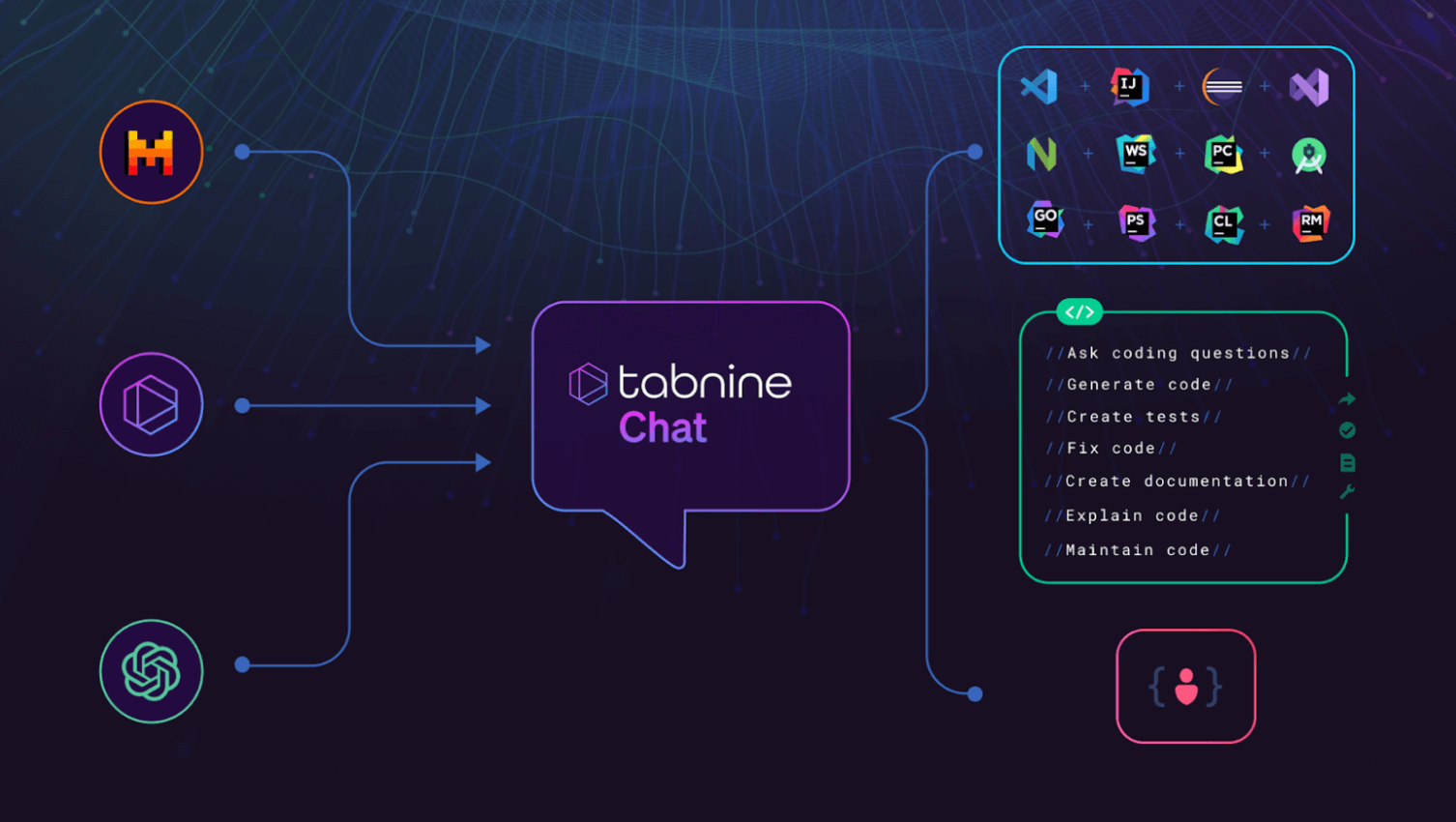
How to take advantage of switchable models for Tabnine Chat
There’s no additional cost to use any of the models for Tabnine Chat. Starting today, every Tabnine Pro user has access to all the models and can pick the model they prefer. Tabnine Enterprise users can contact our Support team and specify the models that should be enabled for their organization.
Check out our Docs to learn more about this announcement. If you’re not yet a customer, you can sign up for Tabnine Pro today — it’s free for 90 days.
6 code refactoring techniques and how to choose
Posted on April 1st, 2024
What are code refactoring techniques?
Code refactoring refers to strategic changes made to software code to make it more efficient and maintainable, but without altering its external behavior.
The primary aim of code refactoring is to improve the non-functional attributes of the software system. Often, this is done to rectify ‘code smells’—parts of the code that do not follow good coding practices. Code refactoring helps fight technical debt, transforming messy, inefficient code into a clean and simple design, and making code easier to maintain and extend.
There are multiple code refactoring techniques, including red-green refactoring, the extract method, and the simplifying method. A key aspect of all these techniques is that they do not add new functionality. Instead, they improve the quality of the existing code, making it easier to work on in the future.
Essential code refactoring techniques with examples
1. Red-green refactoring
Red-green refactoring is a technique that is commonly used in test-driven development (TDD). It involves three basic steps: Red, where you write a test that fails; Green, where you write code to make the test pass; and Refactor, where you improve the code while ensuring that the tests still pass.
The purpose of red-green refactoring is to provide rapid feedback. You will know immediately if your changes have broken the functionality of your code. This technique encourages simplicity and requires that you think critically about your design.
Code example
Red stage:
@Test

public void testSquareArea() {

    int result = Calculator.squareArea(4);

    assertEquals(20, result);  // This will fail

}
In this stage, a test testSquareArea is written to test the squareArea method of the Calculator class. This test is expected to fail initially as the squareArea method has not been implemented yet. The test checks if the method returns a value of 20 when the input is 4, which is incorrect since the area should be 16 (4*4).
Green stage:
public int squareArea(int side) {

    return side * side;  // This will make the test pass

}
Now, the squareArea method is implemented in a way that will make the test pass. It simply multiplies the side length by itself to calculate the square’s area, which is the correct logic.
Refactor stage:
public int squareArea(int side) {

  return side  * side;

}
In this stage, the code is refactored to improve its readability and maintainability without changing its behavior. A local variable area is introduced to hold the result before it is returned, which could make the code easier to understand and debug.
2. Extract method
The extract method is one of the most common refactoring techniques. It involves creating a new method by extracting a group of code lines from an existing method. This approach makes code more readable and reusable, reduces complexity, and helps isolate independent parts of the code.
This technique is particularly useful when you have a method that has become too complicated or long. By breaking it down into smaller, more manageable methods, you can increase the code’s maintainability and readability.
Code example
Before:
public void displayUserInfo() {

    System.out.println("Username: " + username);

    System.out.println("Birthdate: " + birthdate);

    System.out.println("Age: " + age);

}
Initially, the displayUserInfomethod contains all the logic for displaying the user’s information.
public void displayUserInfo() {

    displayUsername();

    displayBirthdate();

    displayAge();

}


private void displayUsername() {

    System.out.println("Username: " + username);

}


private void displayBirthdate() {

    System.out.println("Birthdate: " + birthdate);

}


private void displayAge() {

    System.out.println("Age: " + age);

}
The method is refactored using the extract method technique. The logic for displaying each piece of user information is moved into its own separate method (displayUsername, displayBirthdate, displayAge). This makes the displayUserInfo method more readable and the code more organized.
A further refactoring could create a single method and use an argument to display the relevant information:
public void displayInformation(String infoType) {
  if( infoType == “username” ) {
    System.out.println(“Username: “ + username);

  else if( infoType == “birthdate” ) {
    System.out.println(“Birthdate: “ + birthdate );
  }

 else {
    System.out.println(“Age: “ + age );
}
-
Simplifying method
The simplifying method might involve replacing a complex conditional with query, replacing a parameter with explicit methods, and so on. The goal is to make the code more understandable and manageable.
The simplifying method is crucial in maintaining clean code. It reduces confusion, decreases the chance of errors, and makes it easier to test. When your methods are simple, they become more transparent and predictable, leading to a more robust codebase.
Code example
Before:
public double calculateDiscount(double price) {

    if (price > 1000) {

        return price * 0.1;

    } else {

        return price * 0.05;

    }

}


The calculateDiscount method uses an if-else statement to determine the discount rate based on the price.


public double calculateDiscount(double price) {

    return price * ( (price > 1000) ? 0.1 : 0.05);

}
The method is refactored to use a ternary operator instead, which simplifies the code and reduces the number of lines. The logic remains the same, but it’s now more concise.
4. Composing method
The composing method helps maintain code at a high level of abstraction. It involves breaking down code into smaller, more manageable parts, each of which accomplishes one task.
This approach makes your code more readable and maintainable. It allows developers to understand the code more quickly and reduces the chance of bugs. The composing method also makes the code more reusable, as each method can be used independently of the others.
Code example
Before:
public void saveUserDetails() {

    // Validate details

    // Save details to database

    // Notify user

}
The saveUserDetails method contains all the logic for validating details, saving them to the database, and notifying the user.
public void saveUserDetails() {

    validateDetails();

    saveToDatabase();

    notifyUser();

}


private void validateDetails() { /*...*/ }


private void saveToDatabase() { /*...*/ }


private void notifyUser() { /*...*/ }
The method is refactored using the composing methods technique. The logic for each task is moved into its own separate method (validateDetails, saveToDatabase, notifyUser), making the saveUserDetails method more readable and the code more organized.
5. Abstraction
Abstraction in code refactoring involves recognizing and encapsulating common behaviors or states within your code into separate entities, such as methods or classes. By doing so, you create a higher-level representation, which hides the complex, lower-level details. This promotes code reuse, reduces redundancy, and improves maintainability.
Abstraction can be achieved in several ways, for example, creating abstract classes, interfaces, or encapsulating specific behaviors within methods. This technique is fundamental in object-oriented programming and is crucial for managing complexity in large codebases.
Code example
Before:
public class Car {

    public void startEngine() {

        // Engine start logic

    }


    public void stopEngine() {

        // Engine stop logic

    }


    public void accelerate() {

        // Accelerate logic

    }


    public void brake() {

        // Brake logic

    }

}
The Carclass contains methods for starting/stopping the engine, accelerating, and braking.
After:
public abstract class Vehicle {

    public abstract void startEngine();

    public abstract void stopEngine();

    public abstract void accelerate();

    public abstract void brake();

}


public class Car extends Vehicle {

    @Override

    public void startEngine() {

        // Engine start logic

    }


    @Override

    public void stopEngine() {

        // Engine stop logic

    }


    @Override

    public void accelerate() {

        // Accelerate logic

    }


    @Override

    public void brake() {

        // Brake logic

    }

}
In this refactored example, an abstract Vehicle class is created to encapsulate the common behaviors of different vehicles. The Car class then extends Vehicle and implements the abstract methods. This abstraction allows for the addition of other vehicle types in the future with ease, promoting code reuse and maintainability.
6. Preparatory refactoring
Preparatory refactoring is the process of making a codebase easier to work with before implementing new features or making bug fixes. This technique helps to prevent technical debt and makes the addition of new functionality smoother and less error-prone.
Preparatory refactoring can involve a variety of tasks, such as simplifying complex methods, removing duplicate code, or improving the names of variables and methods. The goal is to prepare the codebase for the changes to come, making the development process more efficient.
How to choose code refactoring techniques
Here are a few considerations that can help you choose the best code refactoring techniques for your project.
Code complexity
When dealing with high code complexity, choosing refactoring techniques that simplify and clarify the code is crucial. Complex code often leads to increased maintenance costs and higher risks of bugs.
Techniques like the simplifying method or composing method are particularly effective in these cases. They help break down complex code into more manageable, readable parts, making it easier for developers to understand and modify the codebase.
Redundant or duplicate code
Redundant or duplicate code can significantly hamper the efficiency and readability of a software system. When encountering such issues, techniques like abstraction and extract method are highly beneficial.
Abstraction allows you to encapsulate common behaviors or states, reducing redundancy and facilitating code reuse. The extract method helps in isolating repeated code into separate methods, enhancing the modularity and maintainability of the code.
Poorly organized data structures
For poorly organized data structures, refactoring techniques that focus on improving data encapsulation and abstraction are vital. This often involves reorganizing classes, methods, and data into a more logical and cohesive structure.
Techniques such as abstraction can be instrumental in this process, helping to create a more intuitive and efficient data model. Additionally, applying the composing method can further enhance the organization by breaking down complex data manipulations into simpler, more focused operations.
Complex conditional logic
When facing complex conditional logic, refactoring techniques like the simplifying method can be extremely useful. This technique involves replacing complicated conditional statements with simpler, more concise expressions, such as using ternary operators or query methods. The goal is to reduce the complexity of the conditions, making them easier to read and maintain.
Inappropriate use of classes and methods
In scenarios where classes and methods are used inappropriately, refactoring techniques focused on proper encapsulation and abstraction should be employed. This might involve restructuring the code to ensure that each class and method has a clear, single responsibility.
Techniques like abstraction and extract method are particularly useful in such cases. They promote better organization of the codebase, ensuring that each component is well-defined and serves a specific purpose. Correcting the inappropriate use of classes and methods enhances code modularity, making it easier to extend, maintain, and reuse.
Automating code refactoring with generative AI
Given the challenges of code refactoring, recent advances in generative AI can be a big help to development teams. Tabnine is an AI-powered coding assistant that can predict and generate code completions in real time, and can provide automated code refactoring suggestions, which are sensitive to the context of your software project.
Tabnine integrates with your Integrated Development Environment (IDE). As you type in your IDE, Tabnine analyzes the code and comments, predicting the most likely next steps and offering them as suggestions for you to accept or reject.
Here are a few examples showing how Tabnine can be used to perform code refactoring:
Tabnine utilizes a Large Language Model (LLM) trained on reputable open source code with permissive licenses, StackOverflow Q&A, and even your entire codebase (Enterprise feature). This means it generates more relevant, higher quality, more secure code than other tools on the market.
Tabnine has recently released Tabnine Chat (currently available on Beta) which is an AI assistant trained on your entire codebase, safe open source code, and every StackOverflow Q&A, while ensuring all of your intellectual property remains protected and private. Tabnine Chat integrates with your IDE and can help you generate comprehensive and accurate code documentation with low effort.
Get a 90-day free trial of Tabnine Pro today, or talk to a product expert.
Code documentation: Types, tools, and challenges
Posted on April 1st, 2024
What is code documentation?
Code documentation is like a road map for a software project. It describes what the code does, how it does it, and why it does it that way. It helps developers understand the code, its dependencies, and its workflow.
When we talk about code documentation, we don’t just mean comments in the code. It also includes administrator and developer guides, API documentation, and system documentation. It can be both internal (for the team) and external (for the end users). Documentation is an essential part of the software development cycle, and yet it’s often neglected or seen as a burden.
The primary purpose of code documentation is to explain the purpose and functionality of the code to other developers. It also serves as a reference for future development and maintenance, both for your future self and for other developers who will work on the code.
Benefits of code documentation
Easier onboarding for new team members
One of the main benefits of code documentation is that it makes onboarding new team members easier. When a new developer joins a project, they can spend days or even weeks trying to understand the codebase. Good documentation can cut this time down dramatically.
New team members can quickly get up to speed with the project’s structure, design decisions, and coding standards. It also helps them understand their roles and responsibilities in the project. Code documentation provides a quick and easy way for them to familiarize themselves with the project and start contributing faster.
Streamlining maintenance and debugging
Code documentation is also crucial for maintaining and debugging the software. It’s not uncommon for a developer to spend hours debugging a problem that could have been solved in minutes with better documentation.
Well-documented code provides clear and concise explanations of the code’s functionality, making it easier to locate and fix bugs. It also helps to prevent the introduction of new bugs during maintenance. By understanding the code’s inner workings, developers can make changes without disrupting existing functionality.
Supporting agile development
In an agile environment, where changes are frequent and a codebase evolves continuously, documentation plays a key role. It helps keep track of changes and ensure that everyone on the team is on the same page.
Documentation in an agile environment needs to be concise, clear, and up-to-date. It should provide a quick overview of the code’s functionality, its dependencies, and any changes made in recent iterations. This allows the team to work in sync and move forward at a rapid pace.
Enhancing collaboration and communication
Code documentation is not just about explaining the code; it’s also about enhancing collaboration between developers. It provides a common language for discussing the code and making collective decisions and fosters knowledge sharing.
Types of code documentation
Here are the main types of code documentation:
- Inline comments: Placed directly within the source code to explain the purpose and functionality of a particular piece of code, and intended for other developers who might be reading the code
- API documentation: Describes the programming interface exposed by a software component, including details about the functions, classes, return types, arguments, and more
- Developer guides: Explain how developers can work with a system, contribute to its development, and accomplish common tasks
- System documentation: Describes the system’s design and functionality, including information about the code, architecture, data flow, interfaces, and more
- Documentation as code: Documentation that’s treated just like the rest of the source code, written in a format that can be version controlled, reviewed, tested, and automated
Code documentation in popular programming languages
Here’s how code documentation is typically done in some of the most popular programming languages:
Code documentation in Java
Java is one of the most widely used programming languages and follows a strict syntax that lends itself well to detailed documentation. The JavaDoc Tool is commonly used for generating API documentation in HTML format from Java source code. JavaDoc comments, beginning with /** and ending with */, are used to document classes, methods, and fields.
Java documentation also includes annotations, which provide metadata about the code. These annotations can be used by the compiler or other tools to generate additional code, perform validations, or produce documentation. JavaDoc tags like@param, @return, and @throws are used to describe method parameters, return values, and exceptions respectively.
Code documentation in Python
Python developers enjoy the simplicity and readability of the language. The Python community believes in making code highly readable, and even self-explanatory. Python uses docstrings for documentation that are written within triple quotes ”’ enabling multiline comments.
Python docstrings can be written in various formats such as the reStructuredText (reST) and Google style. Docstrings are not only used for documentation but also for automated testing and API documentation. Tools like Sphinx can extract these docstrings to create comprehensive documentation.
Code documentation in JavaScript
In the world of JavaScript, JSDoc is a popular tool for generating API documentation. Similar to JavaDoc in Java, JSDoc uses tags and type annotations in comments to document functions, variables, classes, and more.
The main advantage of JSDoc is its flexibility. It supports custom tags, allowing developers to adapt the documentation to the specific needs of their project. Additionally, modern JavaScript frameworks like Vue and React have their own ways of documenting components, making it easier for developers to maintain and refactor code.
Code documentation in C#
C# uses XML documentation comments, which start with /// or /**. These comments are used to generate XML files that can be used by the compiler, the integrated development environment (IDE), or other tools to provide IntelliSense or to generate API documentation.
C# documentation comments also support various tags for describing different parts of the code. For instance, the summarytag provides a brief description of a type or a member, the paramtag describes a method parameter, and the returnstag describes the return value of a method.
What to look for in code documentation tools
Here are a few key features of modern documentation tools:
Language support
Language support is the most basic requirement for a code documentation tool. The tool should understand the syntax and semantics of the programming language you are using. It should also support the specific features of the language, such as annotations in Java or decorators in Python.
Automatic documentation generation
Automatic documentation generation can save a lot of time and effort. The tool should be able to parse the source code and generate documentation based on comments, annotations, and other metadata. It should also be able to update the documentation automatically when the source code changes.
Customization and extensibility
Every project has unique documentation needs. Therefore, the tool should be customizable and extensible. It should allow you to define custom tags, formats, and templates. It should also support plugins or extensions to add additional functionality.
Integration with development environments
Integration with development environments can significantly improve the documentation workflow. The tool should integrate seamlessly with your preferred IDE or text editor. It should provide features such as syntax highlighting, autocompletion, and error checking for documentation comments.
Collaboration features
Collaboration features are important for team projects. The tool should support version control systems, allow multiple authors, and provide features for reviewing and approving changes. It should also support different output formats for sharing the documentation with other stakeholders.
Documentation as code
The concept of documentation as code is becoming increasingly popular in the software development community. It treats documentation with the same level of importance as code. The documentation resides in the source code repository, undergoes the same version control processes, and is subject to code reviews. This approach ensures that the documentation is always up-to-date with the code and that all team members are involved in maintaining it.
Challenges of traditional code documentation
Despite the importance of code documentation, it’s often neglected and raises serious challenges for many development teams.
Code documentation uses valuable development resources
In software development teams, time is a precious commodity. Traditional code documentation is a time-consuming process, requiring developers to meticulously write down the functionality of their code. This process takes away valuable development time that could otherwise be used to write new code or improve existing code.
Moreover, the task of documentation isn’t a one-time process. Every time the code is modified, the corresponding document must also be updated. This constant cycle of writing and rewriting documentation puts a significant strain on the development resources, both in terms of time and manpower.
Code documentation must be frequently updated
Code documentation isn’t static — it grows and evolves with the code. Every change, every bug fix, and every feature addition must be reflected in the documentation. Ignoring these updates can lead to outdated or misleading documentation, which can confuse future developers who might rely on it to understand the code’s functionality.
However, keeping up with these changes is easier said than done. In a fast-paced environment where code changes on a daily basis, updating documentation consistently can be a daunting task.
Code documentation is rarely comprehensive
Despite the considerable time and effort invested in traditional code documentation, it seldom provides a comprehensive understanding of the code. It’s difficult, if not impossible, to capture
every nuance and every decision behind the codebase, and some of these nuances might be critical for future work on the code.
Furthermore, code documentation often focuses solely on the what aspect (i.e., what a specific piece of code does). The why aspect (i.e., why a certain approach was chosen over others, or why a specific bug fix was implemented in a certain way) often gets lost in the documentation process. This lack of comprehensive knowledge can pose significant challenges during code refactoring.
Automating code documentation with Tabnine
Large development teams can’t function effectively unless everyone commits to writing thorough documentation. The problem is that most developers would rather be writing code than documenting it.
Tabnine is an AI coding assistant that makes generating documentation easy. Simply highlight the code you want to document, and then ask Tabnine through the chat window to create documentation. With local and global context awareness enabled, Tabnine will generate documentation that’s in alignment with your coding standards and formatting.
Tabnine utilizes a large language model (LLM) trained on reputable open source code with permissive licenses, StackOverflow Q&A, and even your entire codebase (Enterprise feature), while ensuring all of your intellectual property remains protected and private. This means it generates more relevant, higher quality, and more secure code than other tools on the market.
Tabnine Chat, offered as part of the Tabnine platform, integrates with your IDE and can help you generate comprehensive and accurate code documentation with low effort.
Get a 90-day free trial of Tabnine Pro today, or talk to a product expert.